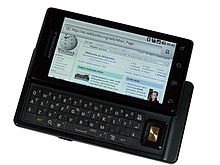
 After 5 years using a LG flip cell phone, I’ve upgrade to the Droid. The LG phone has been great and has done well by me, but it was really way overdue to upgrade to the 21st century.
Here’s my review of the phone on the first real day of usage.
Activating the phone you need a Gmail account. At first I was scratching my head to understand why a Gmail account is needed just to activate the phone. After a second the light bulb went on, hey this is using Android, the Google OS. So it just makes sense that Google would want to drive usage back to their applications. The reason they gave at the store is the Gmail account unlocks some features. Outside of being able to view the email in my new Gmail account, I haven’t found anything that really ties back to Google.
The touch screen took about an hour to get comfortable with the feel and how much pressure to use. It is fun to use the flick feature to quickly scroll through lists. (Its the simple things that I like!)
The keypad is totally flat. Like the touch screen is takes some time to get used to the feel. I’ve been on the phone for a few hours and it’s getting more comfortable to type. I’ve heard from a few women that their nails give them trouble with the keypad.
Interestingly the desktop does not utilize the motion sensor to detect the phone’s orientation. If the keyboard is closed, the desktop will display long ways. When the keyboard is open, then the desktop will display sideways, like what is shown in the picture. Within applications, the motion sensor works and the application will display accordingly to the orientation of the phone regardless if the keyboard is open or not.
Configuring my Comcast email addresses were a snap. I entered the email address and password. The phone figured out all the server and port settings. By default the phone will ring every time an email arrives to notify you. Through the night we would hear the phone ring out the default metallic sounding “Droid”. First thing this morning I reconfigured the phone to vibrate for inbound emails.
Configuring the Facebook application was interesting. After I configured the application and logged in, I was able to select whether or not I wanted to sync my local contacts with my friends in Facebook. I choose to sync and only show the contacts who had phone numbers. Its quick and easy to change the display to show all my friends in the contacts. Now if only I can get my Facebook friends to add their phone numbers to their profiles. It would eliminate the need for me to add phone numbers.
I set up the bluetooth headset to work with both the Droid and my company’s Blackberry. Fortunately the headset was new enough to allow pairing with two devices. The Droid plays nice with the Blackberry over which device has the link. When making a call on the Droid it takes over the link to the headset for the duration of the call. The headset is relinquished back to the Blackberry after the call is done. If I have a call on the blackberry with the headset in use and a call comes in from the Droid, the Droid doesn’t interfere with the existing connection.
Over the course of this weekend, I’ll finish setting up my contacts and entering phone numbers. I purposely didn’t want to port my contacts over from my old phone. There are a lot of numbers that are no longer valid and the organization of the contacts needs to be redone. I’m more than happy to enter the numbers manually and start fresh.
Call quality of the phone is good. I notice a very slight hollow echo, but it is not annoying at all. I haven’t had enough calls from different locations to determine if it is due to the phone or the connection I’m getting. Comparing the quality to my old cell phone, the Droid is way above that phone. The call quality is comparable to the Blackberry. You can mark certain contacts to be part of your favorites list by highlighting the “star” for that contact. If you have a large contact list, this is a must use feature. The phone app also tracks your frequently called numbers making callbacks a snap.
Battery life is another feature that I will be keeping a close eye on over the next few days. I have heard from a few people that they easily get a full day plus on a single charge. If the phone is not being heavily used, the charge can last an entire weekend. This is a lot better than the 6 hours of battery life you get with heavy usage on the iPhone.
I’m very happy to have waited in replacing the old phone. The Android operating system is going to give Apple a run for it’s money. The one feature I have yet to test is the music playback. Also I will be looking into the Droid Apps to see what is interesting.

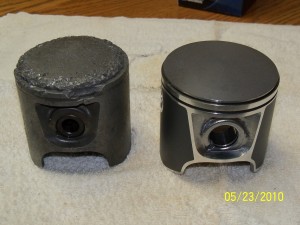 Well, it turned out that one piston threw a ring. The piston and cylinder walls were torn apart pretty bad. As you can see the left piston is a total wreck versus the new piston that is replacing it. Fortunately the crank shaft was in great shape. So I m now rebuilding the top end of the engine. The engines in the skis, because of the beating they take, are designed to make top end rebuilds pretty easy. I bought the top end kit from
 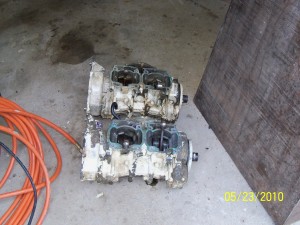 I also had a seized engine that came from my “parts” ski. Since I was pulling one engine apart, I decided to take a shot at pulling the seized engine apart. The one cylinder / piston came apart easily enough. The seized piston one ended up coming out in pieces. Once I had 1/2 of the piston removed, the rest finally pulled away from the cylinder wall and fell apart. In the photo I have both engines with the top end off each. With a little effort I think I can get the seized engine back together working.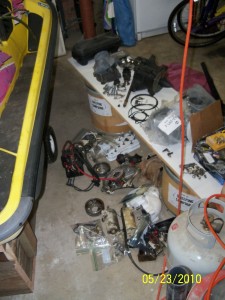

 I’ve finally decided to take the plunge and host my blog elsewhere. No longer is it on a server in my basement. I’ve moved the site to a virtual server at
  After two months of using the Droid, I thought I would review the apps that I find the most helpful and fun. First and foremost it is a phone, I’m very happy with the quality of calls and the quality of the built-in speaker. I configured the contacts app when I first got the phone and haven’t thought twice about it. The voice dial app took a little bit of trial and error to find the right phrases to use to quickly get the phone numbers to come up. Of course the voice dial app provides all sorts of examples to help you quickly figure it out, but that would require reading on my part. RTFM – No Way! The messaging and email apps are used through out the day. Occasionally (once per week) I find the email app will stop communicating with Comcast. The quick solution is the Advance Task Killer app. This app will kill off processes running in the background that are consuming battery life while offering nothing in return. As it kills off these background processes, it also causes the email app to fully reload the next time I open it. This is an ok temporary solution until an update is available for the email app. The other two apps I have residing on the middle screen is the Facebook app and The Weather Channel. The Weather Channel app is a must have. I’ve got five different cities entered so with three taps on the screen I can have the current weather for anyone of the cities. One more tap and I have the 10 day forecast.
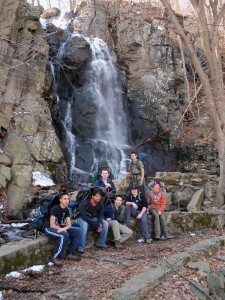 This past Sunday the Philmont crew went on a day hike on the NJ Palisades. The Palisades are a cliff face between the George Washington Bridge and the Tappen Zee Bridge. The cliffs are about 600 high. The hike traversed along the base of the cliffs right next to the Hudson river and then climbed to the top and followed the cliff edge back to the starting point.
 Along the base of the cliffs there was absolutely no snow. The trail took us through the public boat launch, which was closed this time of year. At a trail intersection we had a 20 minute “packs off” break. While at this break we studied the map that we had with us to make sure we “knew” where we were. The map we had was very poor. But the thinking was we couldn’t get lost because we were right next to the Hudson river. Bad thinking.
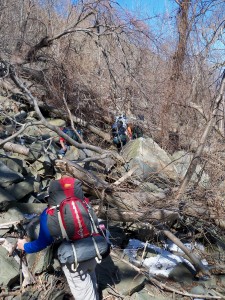 We went about another mile before we realized that we made a mistake. At that point we had 3 more miles moving forward or traverse back through the mess/maze of trees and rocks. The crew elected to continue forward to the waterfall and then climb up the cliff face. All in all this slight navigational error added 5 miles to a 7.5 mile hike.